Baker Signal on Tezos.Systems
Baker Signal on Tezos.Systems shows when your mainnet baker is next scheduled to produce a block and how well it is attesting to blocks and Data Availability Layer (DAL) slots. You only need the baker’s public address or a Tezos domain that points to it.
Open your baker’s signal
Append /signal to the baker’s Tezos.Systems URL. Use the address registered as the baker (the delegate address), even if a separate consensus key signs for it. Both examples below open the same public baker, Baking Benjamins.
- By domain. In
https://tezos.systems/baker.tez/signal, replacebaker.tezwith your baker’s domain. Open bakingbenjamins.tez. - By address. In
https://tezos.systems/tz1address/signal, replacetz1addresswith the full baker address. Open Baking Benjamins by address.
You can also open My Tezos from the homepage, enter the public address or domain in Overview, choose Track address, then select Baker Signal.
Plan maintenance
- In Outage, choose a duration that covers the work, restart and time for your node to catch up. The options are 5, 15, 30 and 60 minutes.
- Read Maintenance gap for the earliest fit. It gives a time range in your browser’s time zone and the block level to be back before. The Next round 0 cards show when your baker is first in line to produce a block.
- Recheck the live page just before stopping services. Expand Schedule coverage & timing to see when the rights were checked or verify the schedule on TzKT. If you see No fitting gap, the selected outage does not fit within the published rights checked. If the schedule is waiting for fresh data, wait for it to update.
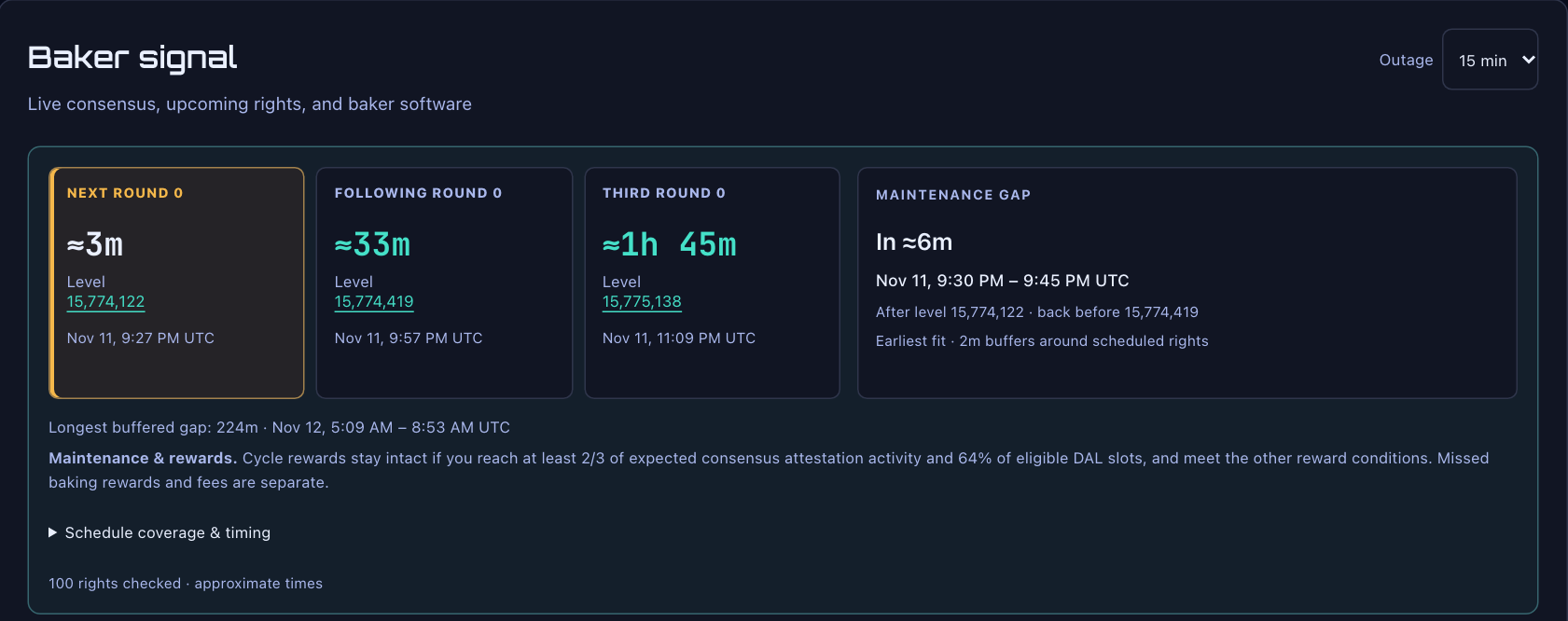
On November 11, 2026, Baking Benjamins had a round-0 right at about 9:27 PM UTC. For a 15-minute restart, the planner suggested 9:30–9:45 PM UTC, after level 15,774,122 and before 15,774,419. Starting immediately would have overlapped the first right. Select the screenshot to read the schedule at full size.
The planner checks up to 100 published round-0 rights and leaves a two-minute buffer before the next right and after a preceding scheduled right. Block times can shift. Consensus attestations and DAL duties continue during a gap, and later-round baking is still possible.
Check attestation and DAL
After maintenance, look for a recent block level after your restart. The three cards answer different questions.
| Card | What to look for |
|---|---|
| Baker working? | Check the last observed baking and attestation activity for signs that the baker is signing again. |
| Attestation | Read the consensus participation percentage alongside the recent attestation results and latest level. A cycle percentage can round to 100.0% even with a miss. |
| DAL | Compare attested slots with attestable slots for the current cycle. N/A means no slots have been assigned yet. No data means the participation reading is unavailable. |

In this snapshot, the last 10 consensus attestations succeeded through level 15,774,091. The separate 58/58 count means the baker attested all 58 eligible DAL slots so far that cycle. After a DAL restart, check again when more slots become eligible to see whether the attested count rises.
If consensus misses repeat, compare the affected levels with your baker and signer logs. If eligible DAL slots keep accumulating without new attestations, check the DAL node and attester profile.
Any questions/comments/concerns? Please contact the Tez Capital team on Discord or Telegram